
Carousel Registration Guide 2026
Register, verify your account and access the Carousel first deposit offer.
Eligible new customers can receive a 100% first deposit match up to R5,000, with a minimum qualifying deposit of R100, 14-day validity and 50x bonus wagering requirement.
Register at CarouselBetline may earn a commission if you register through links on this page, at no additional cost to you. Affiliate disclosure. T&Cs apply. 18+. Gamble responsibly.
Carousel is operated by Carousel Bets (Pty) Ltd and licensed by the North West Gambling Board under bookmaker licence number 2022/4591/07.
⚡ Carousel Quick Facts
Carousel Registration Guide Contents
Carousel Registration: How to Sign Up, Verify Your Account and Make Your First Deposit
Carousel registration is completed online through the account signup process on Carousel.co.za. New customers provide the required personal and contact information, create their account details and confirm that they meet the age and eligibility requirements before the account can be opened.
FICA verification does not need to be completed immediately after registration. Customers can open an account, make deposits and place bets before completing verification, but FICA must be approved before a first withdrawal can be processed. Carousel may request documents such as proof of identity, proof of residential address and banking information as part of this process.
Betline recommends completing FICA verification as early as possible rather than waiting until a withdrawal is requested. Having the required documents approved in advance can reduce the chance of avoidable delays or verification issues when you are ready to withdraw funds.
Once the account has been created, customers can fund it using one of Carousel’s supported payment methods. Eligible new customers making a qualifying first deposit of at least R100 can also access the 100% first deposit match up to R5,000, subject to the promotion terms.
This Carousel registration guide covers the signup process, the information needed to open an account, when FICA verification becomes necessary and what to expect when making your first deposit.
Before You Start Your Carousel Registration
Carousel registration only takes a few steps, but having the correct information ready beforehand makes the process easier. Use accurate personal and contact details when creating the account, particularly information that may later be used to confirm your identity or banking details.
Carousel Registration Requirements
- An email address you can access
Use an active email address that you regularly check. Carousel may use it for account communication, security information and password recovery. - An active South African mobile number
Provide a mobile number that belongs to you and is currently in use. Your number forms part of the contact information linked to the account. - A secure password
Choose a password that is difficult to guess and avoid using the same password across multiple websites. Keep your login details private and stored securely. - Your legal first name and surname
Enter your names exactly as they appear on your South African identity document or passport. These details should match the information used later during FICA verification. - Your legal first name and surname
Enter your names correctly and avoid shortened names or alternative spellings. Accurate personal information makes it easier to confirm the account details later if required. - Your identification details
Have your identification information available when completing the account setup. Make sure any numbers and personal details entered are correct before submitting the form. - Age 18 and over
Carousel accounts are restricted to customers aged 18 or older. You will also need to accept the applicable terms and conditions when creating the account. - Correct personal and banking information
Use information belonging to you when setting up and funding the account. Payment and banking details may later need to correspond with the registered account holder.
Having these details ready before starting should make Carousel registration quicker and reduce the likelihood of having to correct account information later.
One Account Per Person at Carousel
Carousel allows one account per customer. Registration should be completed using your own personal details, mobile number, email address and identification information. Creating duplicate accounts can result in restrictions being applied and may also affect access to bonuses or other promotional offers.
How to Register on Carousel South Africa: Step-by-Step
Carousel registration is completed online through the signup form on Carousel.co.za. The process takes you through your personal information, contact details and account security settings. Enter each detail carefully so the information attached to your account is accurate from the start.
Step 1: Open the Carousel Registration Form
Visit Carousel.co.za and select the Register option to open the account creation form.
You can then begin the signup process by completing the information requested on the registration screen.
Carousel South Africa registration example
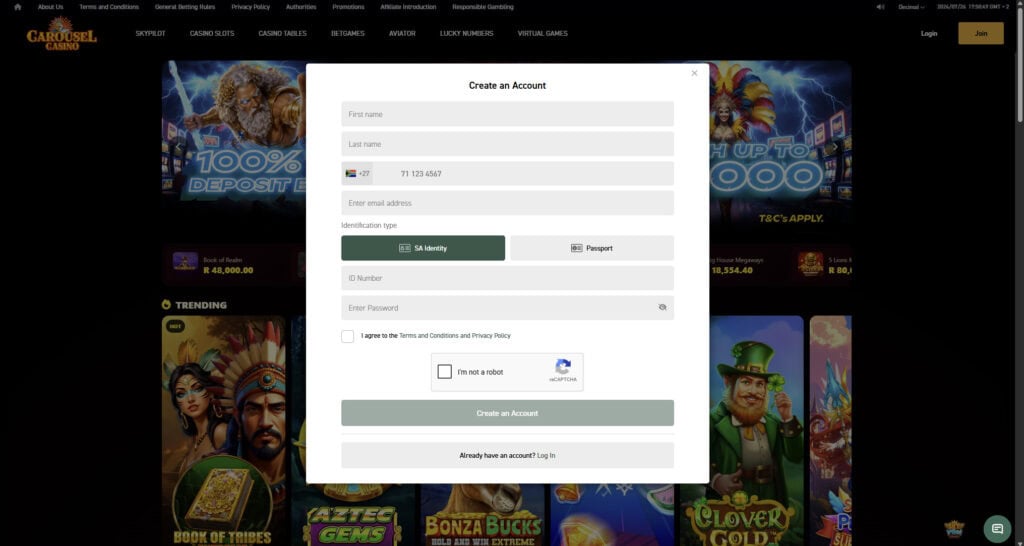
Step 2: Enter Your Personal Details
Provide your first name and surname as they appear on your official identification documents.
Enter the requested contact information, including your mobile number and email address, and complete any additional personal details required by the registration form.
Step 3: Create Your Carousel Password
Choose a secure password for your Carousel account and enter it in the relevant field.
Avoid using an obvious password or one that you already use for important services such as email or online banking.
Step 4: Review the Registration Conditions
Read the applicable Carousel terms, privacy information and consent notices before continuing.
Confirm that you are at least 18 years old and accept the required conditions before submitting the registration form.
Step 5: Complete Your Carousel Registration
Review the information you have entered before creating the account, particularly your name, mobile number and email address.
Submit the form once everything is correct. Your Carousel account can then be used to sign in, make deposits and place bets.
Step 6: Complete Verification Before Your First Withdrawal
Carousel does not require FICA verification immediately after registration, so you can use the account before completing this step.
Verification becomes necessary before your first withdrawal can be processed. Carousel may request identification, proof of residential address and other supporting documents to confirm your account details.
Make sure the documents you provide correspond with the information registered on your Carousel account to reduce the likelihood of verification delays.
Carousel Login
Once your Carousel account has been created, select Login on Carousel.co.za and enter the details linked to your account together with your password.
If you have forgotten your password, use the password recovery option on the login screen and follow the instructions provided. If you are still unable to access your account, contact Carousel customer support for further assistance.
Carousel Welcome Bonuses
Completing your Carousel registration gives eligible new customers access to a 100% first deposit match up to R5,000 when making a qualifying first deposit of at least R100.
The bonus is credited to the bonus wallet after the qualifying deposit and may take up to 24 hours to appear. A 50x wagering requirement applies to the bonus amount, and the promotion remains valid for 14 days. Maximum winnings from the offer are limited to R15,000.
Because the promotion includes deposit, wagering, expiry and payout conditions, check the current Carousel bonus terms before making your first deposit.
Carousel FICA Verification
Carousel requires FICA verification before a first withdrawal can be completed. Customers can register, deposit and place bets before verification is finished, but the required documents must be approved before withdrawal funds are released.
Proof of Identity
Carousel may request a valid South African identity document or passport to confirm the identity of the account holder. The document should be clear, valid and consistent with the personal details registered on the account.
Proof of Address
Proof of residential address may also be required as part of the verification process. The document should be recent, readable and show information that corresponds with the details linked to the Carousel account.
Submit complete and legible copies of any documents requested. Poor-quality images, missing information or details that do not match the account can slow down verification and delay the first withdrawal.
How to Deposit on Carousel
After creating your Carousel account, sign in and open the Deposit section from your account menu. Choose one of the available payment methods, enter the amount you want to deposit and follow the instructions provided on screen.
If you are making your first deposit to qualify for the Carousel welcome offer, make sure you meet the minimum qualifying deposit and any other promotional requirements before completing the payment.
Payment methods available for a Carousel deposit include:
Cards
Visa and Mastercard can be used to fund a Carousel account through the supported card payment options.
Instant bank payments
Carousel supports instant bank payment options such as Ozow and EFTsecure, allowing deposits from supported South African bank accounts.
Digital payment options
Additional payment methods may be available through supported payment providers, including DPO-based payment options.
Vouchers
Carousel also supports voucher deposits, including options such as 1Voucher and OTT, for customers who prefer not to fund their account directly from a bank card.
Mobile wallet payments
Where available through the payment provider, options such as Apple Pay and Samsung Pay may also be displayed in the Carousel cashier.
The minimum amount can vary depending on the payment method selected. Customers depositing for the Carousel first deposit offer should note that the promotion requires a qualifying deposit of at least R100.
Select your preferred payment option, enter the amount and complete the payment using the instructions shown in the cashier. Deposit limits, availability and processing times can differ between payment methods, so check the information displayed before confirming the transaction.
Carousel Registration Troubleshooting
Most Carousel registration and account setup problems can be traced to incorrect personal information, incomplete fields or details that do not match the account holder’s documents. The checks below cover the most common issues.
Your Mobile Number Is Not Accepted
Check the number carefully and make sure there are no unnecessary spaces, symbols or typing errors. If the number has already been used for another Carousel account, a new registration may not be accepted.
Your Personal Details Are Rejected
Review the information you entered and make sure your name, date of birth and other personal details are correct. Details that conflict with identification records can cause problems during registration or later account verification.
The Registration Form Will Not Submit
Check that every required field has been completed and that any mandatory consent boxes have been selected. If the form highlights an error, correct that field before trying to continue.
Your Password Is Not Accepted
Make sure the password meets the format shown on the Carousel registration form. Check for accidental spaces, missing characters or typing errors before submitting it again.
Your FICA Verification Is Delayed
If Carousel has requested verification documents, make sure the files are clear, complete and match the information registered on your account. Missing information or poor-quality images can slow down approval.
Your First Deposit Bonus Has Not Appeared
Check that the deposit was your qualifying first deposit and that it met the minimum amount required for the promotion. Carousel’s welcome offer applies to eligible first deposits of at least R100.
The bonus may take up to 24 hours to appear in the bonus wallet. If it is still missing after that period, review the promotion conditions or contact Carousel support.
Your Deposit Is Not Showing
Allow some time for the payment to update and check whether the transaction was successfully approved by your bank or payment provider.
If the funds were deducted but do not appear in your Carousel balance, keep the payment reference available in case support needs it to investigate the transaction.
You Cannot Log In
Check that you are using the correct login details and password. If you have forgotten your password, use the password recovery option on the Carousel login screen.
If you still cannot access the account after resetting the password, contact Carousel customer support.
Your Withdrawal Has Not Been Processed
Check that your account verification has been completed and that there are no outstanding withdrawal requirements.
If you have an active bonus, confirm that any applicable wagering conditions have also been completed. If the account is verified and all requirements have been met, contact Carousel support for an update on the withdrawal.
Carousel Registration Summary
Creating a Carousel account is a simple online process that involves entering your personal and contact details, setting up a secure password and completing the required registration fields. Using accurate information from the start helps reduce the chance of account or verification issues later.
After registration, eligible new customers can qualify for Carousel’s 100% first deposit match up to R5,000 when making a qualifying first deposit of at least R100. The offer is subject to its own wagering, expiry and maximum winnings conditions, so check the promotion terms before depositing.
Carousel allows customers to register, deposit and place bets before completing FICA verification, but verification must be approved before a first withdrawal can be processed. If you run into problems with registration, deposits, bonuses, login access or withdrawals, check your account details and the relevant requirements first before contacting Carousel support.
Carousel Registration FAQ
Carousel Registration FAQs
How do I register with Carousel?
Visit Carousel.co.za and select Register to open the signup form. Enter the personal and contact information requested, create a secure password, accept the required terms and submit the form once you have checked that your details are correct.
How long does Carousel registration take?
Carousel registration can usually be completed within a few minutes when you have your personal details, mobile number and email address ready. Completing each field accurately can also reduce the need to correct account information later.
What do I need to register with Carousel?
You need your personal details, an active mobile number, an email address you can access and a secure password. You must also be at least 18 years old and accept the applicable terms and conditions before creating an account.
Can I register more than one Carousel account?
No. Carousel allows one account per customer. Creating duplicate accounts can lead to account restrictions and may affect eligibility for bonuses or other promotional offers.
How do I log in to Carousel?
Select Login on Carousel.co.za and enter the account details requested on the login screen together with your password.
What should I do if I forget my Carousel password?
Use the password recovery option on the Carousel login screen and follow the instructions provided. If you are still unable to access your account, contact Carousel customer support for assistance.
Do I need FICA verification when registering with Carousel?
No. Carousel customers can register, deposit and place bets before completing FICA verification. Verification must be completed before a first withdrawal can be processed.
Which documents may Carousel request for verification?
Carousel may request proof of identity, proof of residential address and supporting banking information where required. Documents should be clear, current and consistent with the personal details registered on the account.
Why can Carousel verification be delayed?
Verification can take longer if documents are unclear, incomplete or contain information that does not match the account details. Upload complete and readable documents whenever Carousel requests them.
How do I deposit money on Carousel?
Sign in to your Carousel account and open the Deposit section. Choose one of the payment methods displayed, enter the amount you want to deposit and follow the instructions provided by the payment service.
Which payment methods can I use on Carousel?
Carousel provides a selection of payment options that can include Visa, Mastercard, Ozow, EFTsecure, 1Voucher, OTT and other supported payment services displayed in the cashier. Available methods can change, so check the Deposit section for the current options.
What is the minimum deposit for the Carousel welcome bonus?
The Carousel first deposit promotion requires an eligible first deposit of at least R100. Minimum transaction amounts for ordinary deposits may differ depending on the payment method selected.
How long does a Carousel deposit take to reflect?
Many electronic deposit methods are designed to update the account balance quickly, although processing times can differ between banks and payment providers. Keep the transaction reference if a successful payment does not appear in your Carousel balance.
What welcome bonus is available after Carousel registration?
Eligible new customers can receive a 100% first deposit match up to R5,000 after making a qualifying first deposit of at least R100. The promotion is subject to wagering, expiry and maximum winnings conditions.
How do I qualify for the Carousel 100% first deposit bonus?
Register an eligible new Carousel account and make a qualifying first deposit of at least R100. Carousel matches the eligible deposit by 100% up to a maximum bonus of R5,000, subject to the promotion terms.
What is the wagering requirement on the Carousel welcome bonus?
The Carousel first deposit bonus carries a 50x wagering requirement on the bonus amount. The promotion is valid for 14 days, so the required wagering must be completed within the applicable promotional period.
Why has my Carousel bonus not appeared?
Check that the deposit was your qualifying first deposit, that it met the R100 minimum and that your account is eligible for the promotion. Carousel states that the bonus wallet may take up to 24 hours to update after a qualifying deposit.
How old must I be to register with Carousel?
You must be at least 18 years old to register a Carousel account and participate in betting or promotional offers.
18+ only. Winners know when to stop. Gamble responsibly.
CAROUSEL REGISTRATION GUIDE SOUTH AFRICA

Betline helps bettors understand promotions before signing up with any licensed sports betting site in South Africa.
This guide explains Carousel South Africa registration, including how to sign up, verify your account, deposit, and activate the welcome bonus.