
How to Verify a Mpumalanga Betting Licence with MER Connect
The Mpumalanga Economic Regulator (MER) provides an online system called MER Connect, which allows members of the public to search for bookmaker licences issued by MER and check their licensing status directly with the regulator.
If you’re checking a betting site that claims to hold an MER bookmaker licence, you can use the system to search by its trading name or licence number and compare the results with the information published on the betting site’s website.
This guide explains how to register as a public user, verify a betting site licence using MER Connect and understand the information displayed in the licence register.
At a Glance
MER Connect allows members of the public to check bookmaker licences issued by the Mpumalanga Economic Regulator. This guide explains how to register, search the licence register and compare the results with the information published by a betting site.
- Who can use it: Members of the public can register for a free MER Connect account to access the licence register.
- Registration: Select Public User, complete the registration process and verify your contact details using OTPs.
- Searching for licences: Use Search Existing Licences to find bookmakers by their trading name or licence number.
- Licence information: Check the registered licence holder, trading name, bookmaker licence number, licence type, expiry date and status.
- Checking the correct operator: Compare the regulator’s records with the licensing information displayed on the betting site’s website.
- Important warning: A valid bookmaker licence does not automatically prove that a website is legitimate. Scam sites can copy genuine licensing details. Contact MER directly if you suspect a website is impersonating a licensed bookmaker.
- Official licence records: MER Connect provides information directly from the provincial regulator, although immediate updates to every record cannot be guaranteed.

What Is MER Connect?
MER Connect is an online licensing system operated by the Mpumalanga Economic Regulator (MER), which allows members of the public to search for existing bookmaker licences issued in Mpumalanga and check their licensing details.
For anyone wanting to verify an online betting site that claims to be licensed by MER, the system provides access to the regulator’s licence records through its Search Existing Licences feature. Users can search for a bookmaker using its trading name or licence number, making it possible to find a licence record even if the licence number is not displayed on the betting site’s website.
The search results provide information such as the bookmaker’s registered licence holder, trading name, licence type, expiry date and current licence status. These details can be compared with the information published on the betting site’s website to check if the operator’s licensing claims match the regulator’s records.
To access the licence register, users need to create an account and log in to the system. MER Connect can be accessed through the official MER Connect page or directly through the MER Connect login page.

How to Register for MER Connect
Before you can start searching for bookmaker licences, you’ll need to register for a free MER Connect account. The registration process is completed online and requires you to provide some basic information to create your account. Once your registration is successful, the system sends your login credentials to the email address you provided, allowing you to sign in and access the licence register.
If you’re using MER Connect for the first time, the process might be unfamiliar, especially if you’ve never used an online gambling regulator’s licensing system before. Fortunately, you don’t need to be a bookmaker or work in the betting industry to access the public functions.
The following steps will guide you through the registration process, from opening the MER Connect website and creating your account to signing in and getting ready to search for and verify bookmaker licences.
Step 1: Open the MER Connect Portal
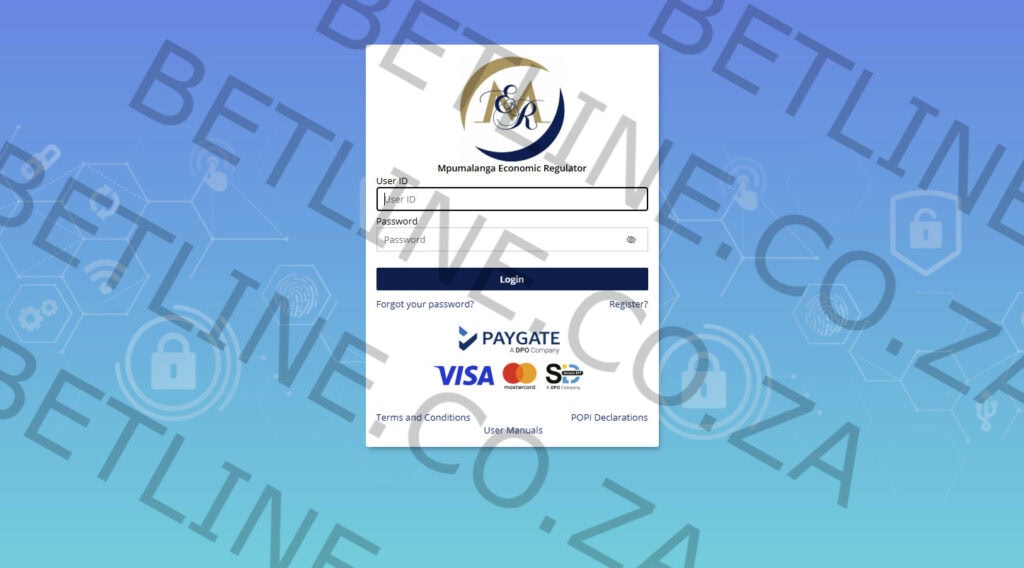
Visit the MER Connect login page.
The login screen displays the Mpumalanga Economic Regulator’s logo, together with fields for your User ID and password.
Select Register to begin creating an account.
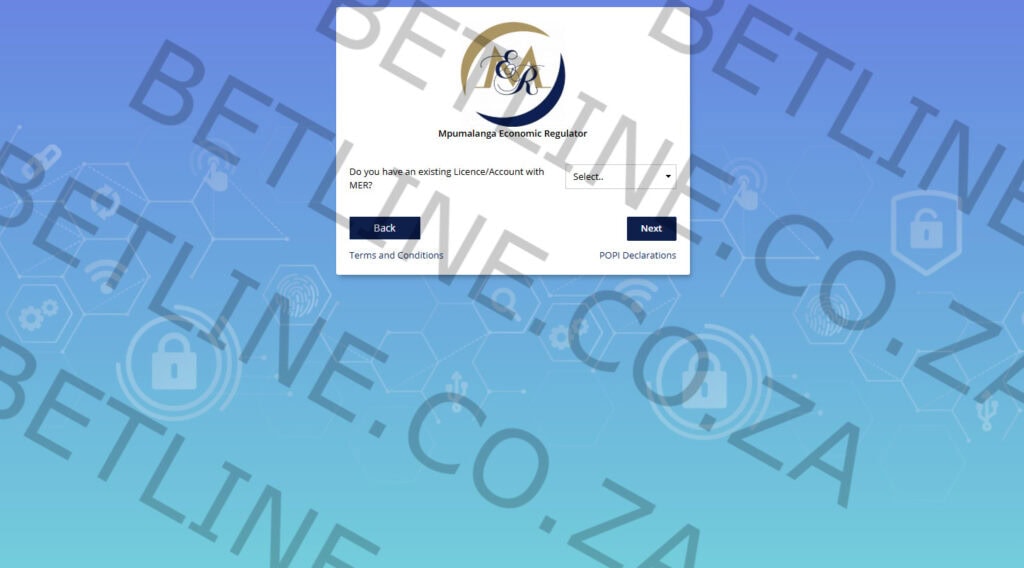
You will be asked if you have an existing Licence/Account with MER. If you do not have an existing account select no, then select next to continue.
Step 2: Complete the Registration Form
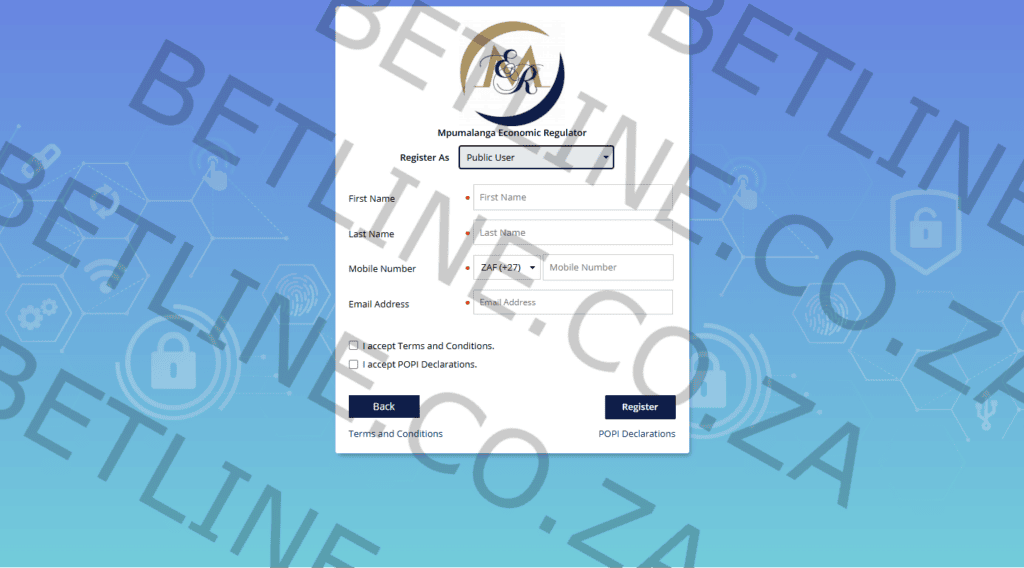
On the registration page, select Public User from the Register As dropdown menu. This is the option for members of the public who want to access MER Connect to check bookmaker licences.
You will need to provide your first name, last name, ID number, mobile number and email address. Make sure you enter your details correctly, as both your mobile number and email address will need to be verified before you can complete your registration.
To verify your contact details, MER Connect will send a separate One-Time PIN (OTP) to your mobile number and email address. Enter each OTP in the relevant field to confirm your details. Keep in mind that the email OTP can take a little longer to arrive, so don’t be concerned if it doesn’t appear immediately. If you still haven’t received it, check your spam or junk folder, or use the resend option to request the OTP again.
Before completing your registration, read and accept the Terms and Conditions and POPI Declarations by ticking the two checkboxes provided. Once you’ve completed the required fields and verified both your mobile number and email address, click Register to submit your registration.
Step 3: Log In to MER Connect
You will receive an email from noreply@merportal.org.za containing your login credentials. These credentials are used for your first login, after which you will need to change your password before accessing your newly created MER Connect account.
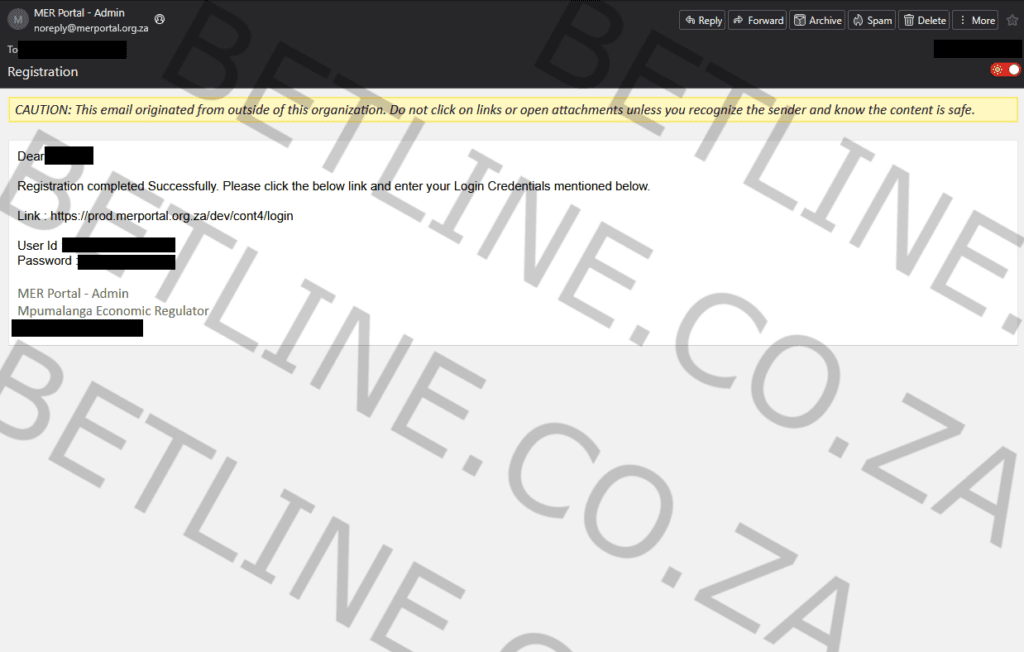
Return to the MER Connect login page and enter the credentials provided in the email.
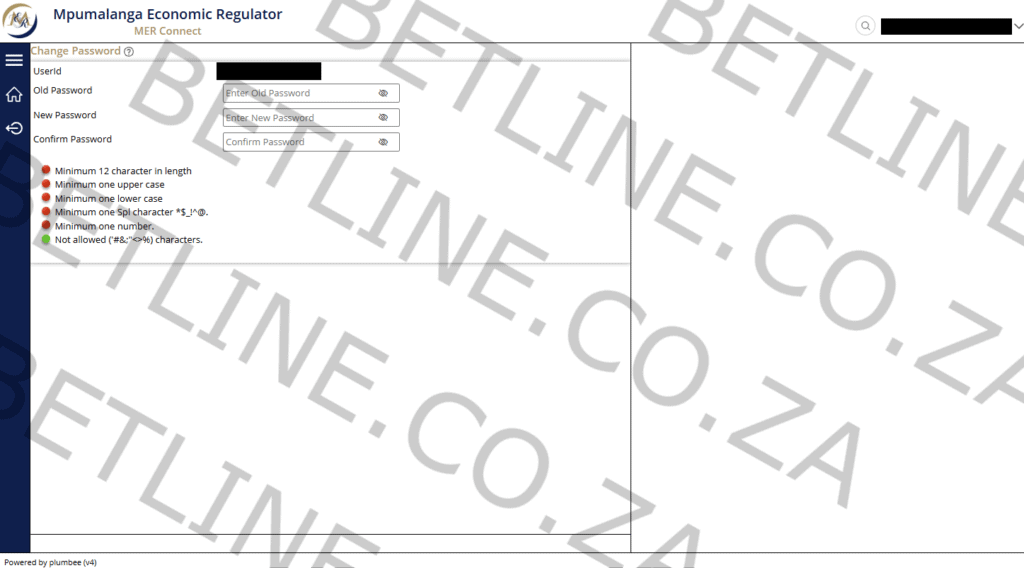
Once you have logged into your newly created MER Connect portal account, follow the on-screen instructions to change your password. After successfully updating your password, you will have access to the MER Connect dashboard and the functions available to your account.
How to Search for a Bookmaker Licence on MER Connect
Once you have successfully created and activated your MER Connect account, you can use the portal to search for bookmaker licences issued by the Mpumalanga Economic Regulator (MER).
The portal provides access to a searchable licence register, allowing members of the public to look up bookmakers using their trading names or licence numbers. This is useful for checking a bookmaker’s licensing details directly with the Mpumalanga Economic Regulator.
The following steps explain how to access the licence register , search for a bookmaker and review the available betting site licensing information.
Step 1: Select Search Existing Licences
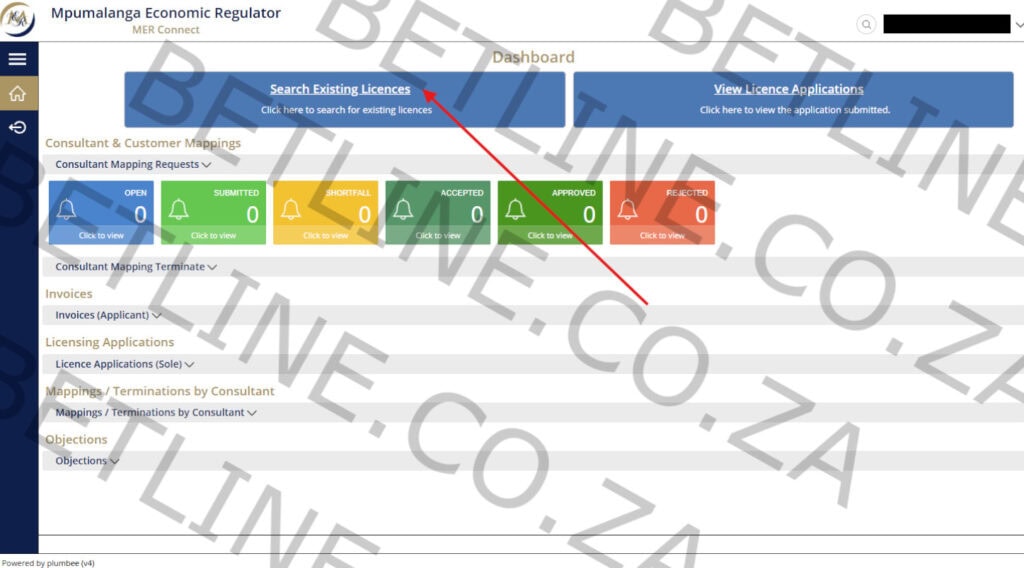
From the MER Connect dashboard, click the blue Search Existing Licences button.
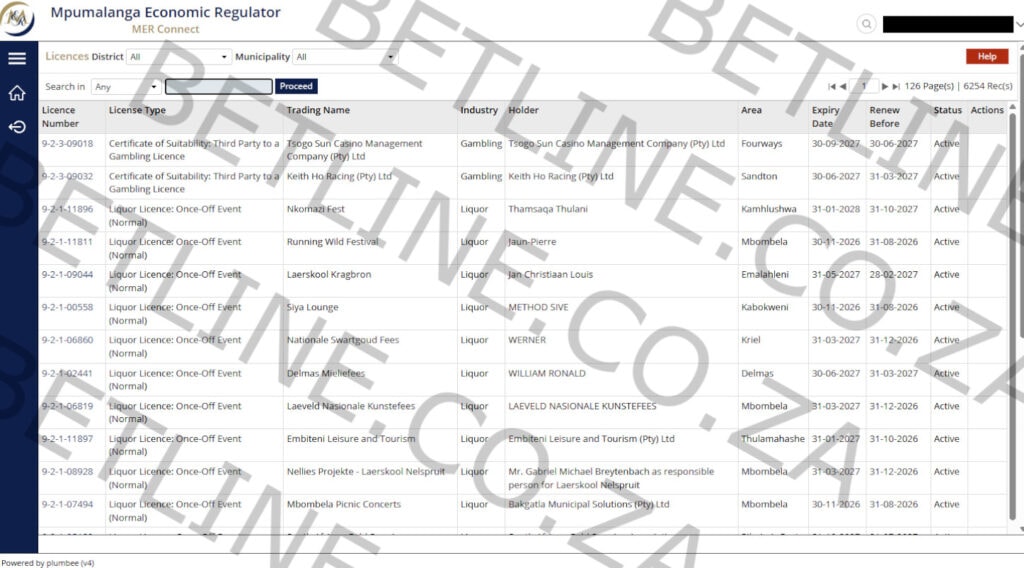
This opens the licence register, where existing records are displayed in a searchable table.
Step 2: Enter the Bookmaker’s Name or Licence Number
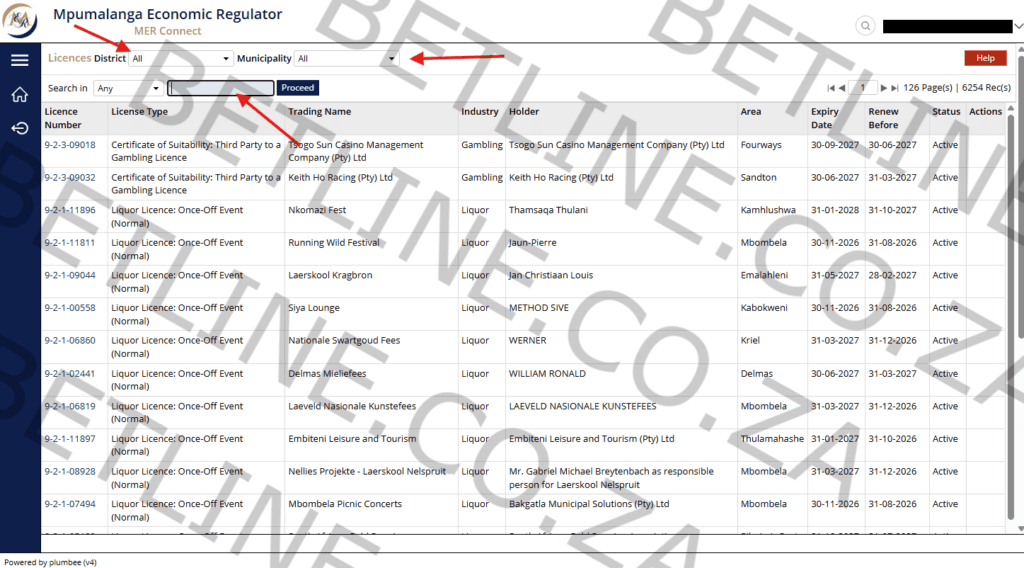
Once the licence register opens, locate the search field near the top of the page. You can search for a bookmaker using its trading name or licence number. The register also provides district and municipality filters to help narrow down your search results.
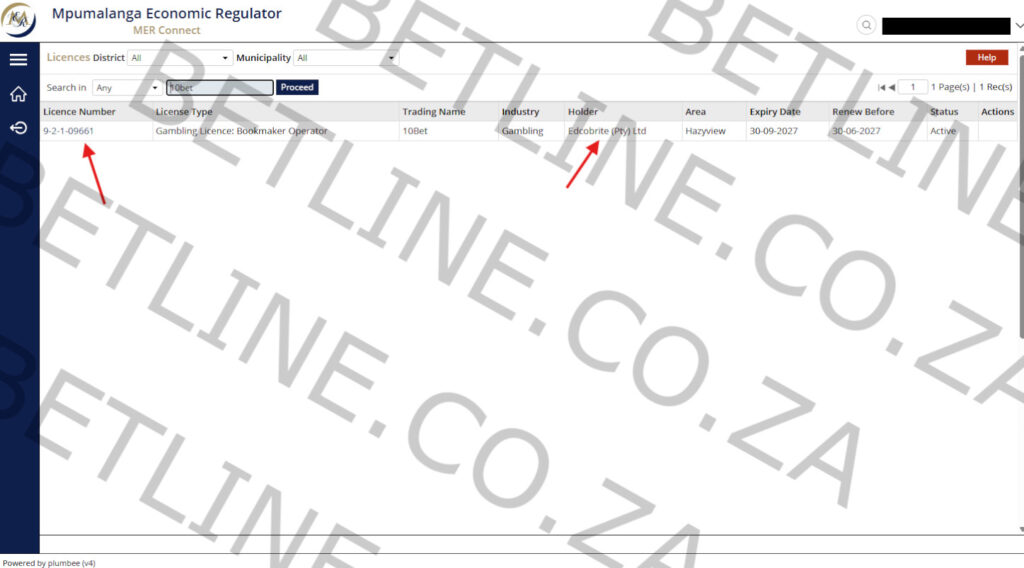
Enter the bookmaker’s trading name or licence number and click Proceed to perform the search. The register will display matching records, which you can review to find the bookmaker you’re looking for.
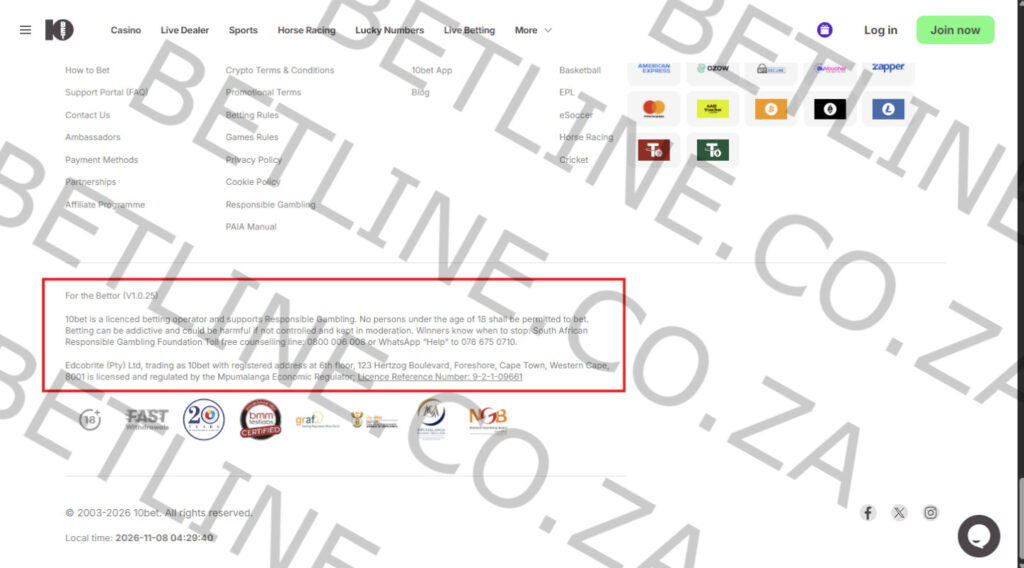
If you don’t know the licence number, check the betting site’s footer, About Us page or terms and conditions. These sections usually contain the operator’s registered company name, licensing authority and bookmaker licence number.
When reviewing the search results, pay attention to the Licence Type column. For bookmaker licence verification, look for records identified as Gambling Licence: Bookmaker Operator.
MER Connect contains different gambling licence categories, so make sure you’ve found the correct licence type and that the trading name and registered licence holder match the information published on the betting site’s website.
Step 3: Check the Licence Details
Once you have located the relevant bookmaker, review the information displayed in the register.
The main details to check are:
| Licence Information | What to Check |
|---|---|
| Licence Number | The bookmaker licence number issued by MER |
| Licence Type | Confirmation that the record relates to a bookmaker operator |
| Trading Name | The name under which the bookmaker operates |
| Licence Holder | The registered person or company holding the licence |
| Expiry Date | The date shown for the licence’s expiry |
| Status | The current status displayed in the register |
Swipe left or right to view the full table.
The register also displays other information, such as the relevant area and renewal details.
Step 4: Compare the Information With the Betting Site
Once you’ve found a matching bookmaker licence record, compare the information displayed on MER Connect with the licensing details published on the betting site’s website. Check that the registered licence holder, trading name, licence number and current licence status match what the betting site claims.
If you cannot find the bookmaker in the register, it doesn’t necessarily mean the betting site is unlicensed. Bookmakers in South Africa can hold licences issued by different provincial gambling regulators, so make sure you’re checking with the correct regulator. If the betting site claims to be licensed by MER, try searching for its registered company name or licence number instead of its trading name.
It’s also important to remember that finding a valid bookmaker licence doesn’t automatically mean the website you’re visiting is legitimate. Scam betting sites can copy genuine licence numbers, company details and even link to official licence certificates to make themselves appear licensed.
For this reason, use your own judgement and pay attention to anything that seems out of place. Check the website address carefully and look for inconsistencies in the operator’s information. If something doesn’t look right, or you’re unsure if the website belongs to the licensed bookmaker, contact the Mpumalanga Economic Regulator directly for confirmation.
You can also use the National Gambling Board’s Verified Operators Portal to check bookmaker licensing information supplied by South Africa’s provincial gambling regulators.
Why Use MER Connect to Verify a Betting Site Licence?
For betting sites that hold bookmaker licences issued by the Mpumalanga Economic Regulator (MER), checking directly with the provincial regulator is one of the most reliable ways to confirm their licensing information.
One of the main advantages of using MER Connect is that the information comes directly from the authority responsible for issuing and overseeing these licences. This means the records are more likely to reflect recent changes to a bookmaker’s licensing status, such as renewals, suspensions or cancellations.
Although the National Gambling Board provides its own Verified Operators Portal, the information displayed there depends on records supplied by provincial gambling regulators. For this reason, MER Connect could provide more up-to-date licensing information for bookmakers licensed in Mpumalanga, especially if changes have not yet been reflected in the national register.
This does not guarantee that every record on MER Connect is updated immediately, but checking directly with the provincial regulator is generally a better starting point than relying on third-party websites, which could contain outdated or incorrect licensing information.
MER Connect: Official Links and Support
- MER Connect information: mer.org.za/live/mer-connect-page
- MER Connect login/registration: prod.merportal.org.za/dev/cont4/login
- Mpumalanga Economic Regulator: mer.org.za
- MER contact number: 013 750 8000
For questions about bookmaker licensing details or information shown in the register, contact the Mpumalanga Economic Regulator directly.
MER Connect Licence Verification FAQs
Answers to common questions about registering for MER Connect and checking bookmaker licences issued by the Mpumalanga Economic Regulator.
-
Is MER Connect free to use?
Yes. Members of the public can register for a free MER Connect account to search for existing bookmaker licences. You will need to complete the registration process and verify your contact details before accessing the licence register. -
Do I need an account to check a bookmaker licence on MER Connect?
Yes. To search the MER Connect licence register, you need to register and log in to your account. Members of the public can select Public User during registration. Once registered, you can access the Search Existing Licences feature. -
Can I search for a bookmaker without knowing its licence number?
Yes. MER Connect allows you to search using a bookmaker’s trading name or licence number. If you cannot find the correct record using the brand name, check the betting site’s footer or terms and conditions for its registered company name and try searching again. -
Can MER Connect verify bookmaker licences issued by other provincial regulators?
No. MER Connect is used to check licences issued by the Mpumalanga Economic Regulator. If a betting site holds a bookmaker licence issued by another provincial gambling regulator, you should check with that authority or use the National Gambling Board’s Verified Operators Portal. -
Does a valid bookmaker licence mean a betting site is legitimate?
Not necessarily. Scam betting sites can copy genuine licence numbers, company information and licence certificates from licensed operators. A valid licence confirms the licensing record, but not that the website displaying it belongs to the licensed bookmaker. If you suspect a website is impersonating an operator, contact MER directly. -
Is MER Connect more up to date than the National Gambling Board’s licence register?
MER Connect provides access to licensing records held by the provincial regulator responsible for issuing the licences. Its records could reflect changes before they appear in the National Gambling Board’s Verified Operators Portal, which relies on information supplied by provincial regulators. However, there is no guarantee that every MER Connect record is updated immediately.