
Playbet Registration Guide 2026
Register, verify your account, receive 200 Spins and claim the Playbet first deposit match.
Eligible new customers can receive 200 Spins plus a 100% first deposit match of up to R20,000.
Register at PlaybetBetline may earn a commission if you register through links on this page, at no additional cost to you. Affiliate disclosure. T&Cs apply. 18+. Gamble responsibly.
Playbet is licensed by the Mpumalanga Economic Regulator under licence number 9-2-1-00090.
⚡ Playbet Quick Facts

Playbet Registration Guide Contents
Playbet Registration is available to eligible customers aged 18 or older who access the betting site from South Africa. The process takes around five minutes and is completed through a single-page signup form.
You will be asked to provide your personal and contact information, together with a South African ID number or passport number. After submitting the form, you must complete the required email and mobile-number verification steps.
Playbet is a locally licensed betting site regulated by the Mpumalanga Economic Regulator. You can create an account and make a deposit before completing FICA verification, but no withdrawal can be processed until your identity, address and banking details have been verified.
What You Need Before You Register at Playbet
Before starting your Playbet Registration, make sure you have the following information available. Preparing these details beforehand will make it easier to complete the form accurately and avoid delays during account verification.
Playbet Registration Requirements
- South African mobile number
An active mobile number is required for SMS verification, account notifications and password recovery. Make sure you can receive messages on the number you provide. - Valid email address
Playbet sends account confirmation and security messages to your registered email address. Use an address you can access and check that it has been entered correctly. - South African ID number or passport
The registration form allows you to select either SA Identity or Passport. South African customers can enter their 13-digit ID number, while eligible customers using a passport can provide the corresponding passport number. - Age 18+
Playbet registration is restricted to adults aged 18 or older. The date of birth associated with your identification details must confirm that you meet the legal age requirement. - First name and surname
Enter your full legal name exactly as it appears on your ID document or passport. These details must match the documents submitted during FICA verification. - Secure password
Create a strong password using a combination of letters, numbers and symbols. Avoid using a password that you already use for another website or account.
Playbet Single Account Policy
Playbet allows one account per eligible customer. Do not create an additional account if you have previously registered using another mobile number or email address.
Duplicate or related accounts may be reviewed, restricted or closed. Promotional rewards or winnings associated with accounts that breach Playbet’s account rules may also be withheld or forfeited under the applicable terms.
How to Register on Playbet: Step by Step
The Playbet signup form is displayed on a single page, allowing you to complete and review all required fields before submitting your registration. The process is broadly the same when using a desktop computer or mobile browser.
Step 1: Visit the Playbet Official Website
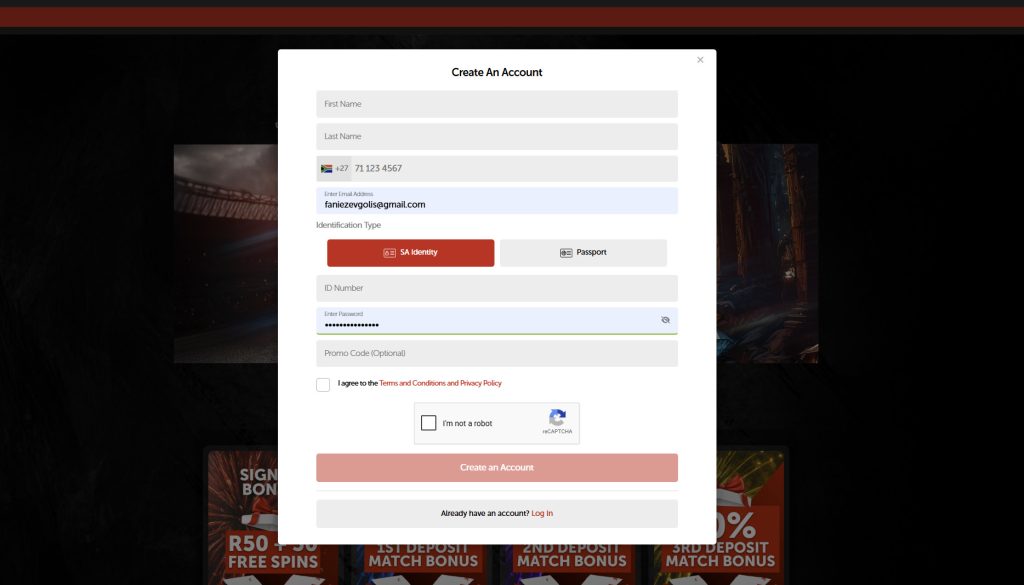
Open your browser and visit the official Playbet website. Select the Join button near the top of the page to open the Create an Account form.
Step 2: Enter Your First Name and Last Name
Enter your first name and surname exactly as they appear on your South African ID document or passport.
Avoid using nicknames, shortened names or different spellings. Incorrect personal information can cause delays when your account is checked during FICA verification.
Step 3: Add Your South African Mobile Number
Enter an active South African mobile number in the field provided.
Where the +27 country code is already displayed, enter your number without the first zero. For example, a number normally written as 071 123 4567 would be entered as 71 123 4567.
Step 4: Enter Your Email Address
Provide a valid email address that you can access.
Your email address may be used for account confirmation, password recovery, security notifications and communication from Playbet. Check the spelling carefully before continuing.
Step 5: Select Your Identification Type and Enter Your ID Number
Choose the identification type that applies to you.
South African customers can select SA Identity and enter their 13-digit South African ID number. Eligible customers registering with a passport can select Passport and enter the passport number shown on their document.
Step 6: Create a Secure Password
Choose a strong password for your Playbet account.
Use a combination of upper- and lowercase letters, numbers and symbols where permitted. Avoid using easily guessed information such as your name, mobile number or date of birth.
Use the password visibility icon, where available, to check that the password has been entered correctly before continuing.
Step 7: Enter a Promo Code (Optional)
The registration form may include an optional Promo Code field.
Enter a valid code if one has been provided to you. Leave the field blank when registering through a tracked partner link unless specific instructions state that a code is required.
The field is optional and does not need to be completed to submit the registration form.
Step 8: Accept the Terms and Complete Sign Up
Read the Playbet Terms and Conditions and Privacy Policy, then select the required confirmation box.
Complete the reCAPTCHA security check and select Create an Account to submit the registration form.
Review your details before submitting because incorrect names, identification numbers, mobile numbers or email addresses can delay verification.
Step 9: Verify Your Email and Mobile Number
After submitting the form, follow the verification instructions sent by Playbet.
You may receive an email containing a confirmation link and an SMS containing a one-time PIN or verification code. Open the email and follow the confirmation link, then enter the SMS code when prompted.
Once the required contact verification steps have been completed, your registration is complete and you can access your Playbet account. FICA verification is still required before withdrawals can be processed.
Playbet Registration Complete
You can now log in to Playbet using your registered login details.
Your account area provides access to features such as your available balance, current and settled bets, bonus offers, wallet history, transactions, notifications and personal information.
The Verification section may continue to display an action-required message until the requested FICA documents have been uploaded and approved.
Making Your First Deposit on Playbet
After logging in, select the Deposit button to open the Playbet cashier.
Playbet supports more than 10 payment methods. Options listed in the July 2026 Playbet information include:
- Ozow
- Apple Pay
- Samsung Pay
- Walletdoc
- Credit cards
- Instant EFT
- Ozow Crypto
- 1Voucher
- OTT Voucher
- BluVoucher
The general minimum deposit is R10, although individual methods may have different limits. A minimum deposit of R100 is required for the qualifying welcome deposit matches.
Select your preferred payment method, enter the amount you want to deposit and follow the instructions provided by the payment service. Successfully processed funds should appear in your Playbet balance.
Available methods can change, so confirm the current options and limits inside the Playbet cashier before depositing.
Playbet Welcome Offer
Eligible new Playbet customers receive 200 Spins automatically after registering an account. The Spins can be used on selected Pragmatic Play reel games, including Fire Strike, 888 Dragons, Big Bass Bonanza 1000 and Extra Juicy.
New customers can also qualify for a 100% first deposit match of up to R20,000. The first deposit must be at least R50. Customers who deposit less than R50 on their first deposit will not qualify for the promotion.
The matched bonus is divided between the sports and betting games bonus wallets. Different eligible products, wagering requirements and withdrawal conditions apply to each wallet.
Key Terms for the Playbet Welcome Offer
- Available to eligible new Playbet customers only.
- The signup reward includes 200 Spins credited automatically after registration.
- The Spins can be used on Fire Strike, 888 Dragons, Big Bass Bonanza 1000 and Extra Juicy.
- A 100% match of up to R20,000 is available on the first qualifying deposit.
- The first deposit must be at least R50 to qualify for the promotion.
- The deposit match is divided between the sports and betting games bonus wallets.
- A deposit of at least R100 is required before winnings from the 200 Spins can be withdrawn.
- The R100 or higher deposit must be rolled over once at minimum odds of 1.6.
- The maximum withdrawal from the 200 Spins is R1,000.
- Deposits from R50 to R1,000 have a maximum withdrawal of R10,000.
- Deposits from R1,001 to R5,000 have a maximum withdrawal of R20,000.
- Deposits from R5,001 to R10,000 have a maximum withdrawal of R30,000.
- Deposits of R10,001 or more have a maximum withdrawal of R50,000.
- Bonuses must generally be used within seven days of being credited unless otherwise stated.
- Wagering requirements, eligible-product restrictions, maximum withdrawal limits and FICA verification requirements apply.
Maximum withdrawal is not the same as the amount credited as a bonus. The applicable limit depends on the amount of the first deposit and is divided between the sports and betting games bonus wallets.
Check the current Playbet promotional terms before claiming or using a bonus because availability and conditions can change.
Playbet FICA Verification
You can register and deposit on Playbet before completing FICA verification. However, Playbet cannot process a withdrawal until the required verification checks have been completed.
FICA verification confirms your identity, residential information and banking details. The information on your documents must match the personal details entered during registration.
The Verification section in your Playbet account may display Actions Required until all requested documents have been submitted and approved.
FICA Documents Required for Playbet
- Proof of identity Provide a clear copy or photograph of an accepted identity document, such as a South African smart ID card, green barcoded ID book or passport where applicable.
- Proof of address Provide a recent document displaying your name and residential address. Examples can include a utility bill, municipal account, bank statement or qualifying retail account statement.
The document normally needs to have been issued within the previous three months. - Proof of banking details Provide a bank statement, bank-generated account confirmation or another accepted document showing the account holder’s name and bank account details.
The banking information must belong to the registered Playbet account holder.
How to Submit Your FICA Documents to Playbet
Log in to your Playbet account and open the account or profile menu. Select the Verification section and follow the instructions for uploading each requested document.
Upload clear colour copies or photographs. Make sure:
- All information is readable.
- The complete document is visible.
- The document has not expired.
- The name and identification number match your Playbet profile.
- The banking account belongs to you.
- The proof of address falls within the accepted date period.
Incorrect details, unreadable images or incomplete documents can delay approval. Check the reason shown in your account or contact Playbet support if a document is rejected.
Playbet Registration Troubleshooting
Most Playbet signup issues can be resolved by checking the information entered in the registration form or repeating the affected verification step.
The sections below cover common registration problems and practical steps you can take.
ID Number or Passport Rejected During Registration
Check that you selected the correct identification type and entered every number or character accurately.
South African customers using a South African ID should select SA Identity. Customers using a passport should select the Passport option and enter the number exactly as shown on the document.
Remove unnecessary spaces and confirm that your name and identification details match. Contact Playbet support if valid information continues to be rejected.
SMS Verification Code Not Received
Confirm that your mobile number has been entered correctly.
When the +27 country code is already included, do not enter the leading zero from your South African mobile number.
Check that your phone has network reception and can receive SMS messages. Wait briefly before requesting another code because repeated requests can cause older codes to expire.
Contact Playbet support if the message still does not arrive.
Verification Email Not Received
Check your spam, junk and promotions folders before requesting another verification email.
Confirm that the address entered during registration is correct. A spelling mistake in the email address will prevent the confirmation message from reaching you.
Use the resend option inside your Playbet profile where available, or contact support to correct the address.
Registration Form Not Loading
Open the registration page in an updated version of Chrome, Firefox, Edge or Safari.
Avoid using a browser built into another application, such as a social-media app. Clear the browser cache, reload the page and temporarily disable extensions that may block scripts or cookies.
You can also try another supported browser or device.
reCAPTCHA Not Working
Refresh the registration page and complete the reCAPTCHA again.
Privacy extensions, script blockers, VPN connections and outdated browsers can interfere with the security check. Temporarily disabling the affected extension or using another updated browser may resolve the problem.
Make sure cookies and JavaScript are enabled.
Promo Code Not Applying
Check that the promo code has been entered in the correct field and matches the supplied code exactly.
Promo codes may be case-sensitive, limited to specific campaigns or restricted to eligible new customers. A code may also be unnecessary when you register through a tracked affiliate link.
The Promo Code field is optional, so you can continue without it unless the promotion specifically requires a code. Contact Playbet support if an expected promotion is not credited.
Email Address Already in Use
An email-address warning may mean that the address has already been connected to an existing Playbet account.
Do not create a duplicate account. Use the login or password-recovery option to regain access to the existing account.
Contact Playbet support if you do not recognise the account or cannot recover your login details.
Need more help? Playbet provides 24/7 customer support through channels listed on its website, including live chat, email, telephone support and its help portal. Account disputes that cannot be resolved directly may be referred to the Mpumalanga Economic Regulator.
Playbet Registration FAQ
How do I register on Playbet?
Visit the official Playbet website and click the Join button. Complete the Create an Account form with your name, South African mobile number, email address and South African ID or passport number. Create a secure password, accept the required terms, complete the reCAPTCHA and submit the form. Follow the email and SMS instructions to verify your contact details.
Do I need a promo code to sign up at Playbet?
No. The Promo Code field is optional, so you can complete your Playbet registration without entering a code. Enter a code before submitting the form only when one has been provided for a specific promotion or campaign. A promo code may not be required when registering through a tracked partner link.
How long does Playbet Registration take?
Playbet Registration takes around five minutes for most customers. The signup form is displayed on a single page, allowing you to complete and review your personal, contact and identification details before submitting the application. The total time can depend on how quickly you receive and complete the contact-verification steps.
Can I use Playbet before completing FICA verification?
You can complete your Playbet registration and make a deposit before your FICA documents have been approved. However, withdrawals cannot be processed until your account is FICA verified. Check the Verification section of your account for any documents or actions that remain outstanding.
What documents are needed for Playbet FICA verification?
Playbet may request proof of identity, such as a South African smart ID card, green barcoded ID book or passport where applicable. You may also need recent proof of address and proof of banking details. The information on the documents must match the personal details entered during registration.
Can I open more than one Playbet account?
No. Playbet allows one account per eligible customer. Do not create a new account if you have previously registered using another mobile number or email address. Duplicate or related accounts may be reviewed, restricted or closed, and associated promotional rewards may be forfeited under the applicable terms.
What welcome offer do new Playbet customers receive?
Eligible new customers receive 200 Spins automatically after registration. Playbet also offers a 100% first deposit match of up to R20,000 on a qualifying first deposit of R50 or more. The matched bonus is split between the sports and betting games bonus wallets. Wagering requirements, expiry periods and maximum withdrawal limits apply.
What happens if my ID number is rejected during registration?
Check that you selected the correct identification type and entered every digit or character accurately. South African customers using an ID number should select SA Identity, while eligible customers using a passport should select Passport. Contact Playbet support if valid identification details continue to be rejected.
Can I register on Playbet using a passport?
The Playbet registration form includes a Passport option. Eligible customers registering with a passport can select Passport as the identification type and enter the passport number exactly as it appears on the document. The information must match the documents later submitted for FICA verification.
What should I do if I do not receive the SMS verification code?
Check that your mobile number has been entered correctly. When the +27 country code is already displayed, enter your South African mobile number without its leading zero. Make sure your phone has network reception, wait briefly and request another code if the option is available. Contact Playbet support if the message still does not arrive.
18+ only. Winners know when to stop. Gamble responsibly.
PLAYBET REGISTRATION GUIDE SOUTH AFRICA

Betline helps bettors understand promotions before signing up with any licensed sports betting site in South Africa.
This guide explains Playbet South Africa registration, including how to sign up, verify your account, deposit, and activate the welcome bonus.